<html><!-- #BeginTemplate "/Templates/cresc_abt_cnt_rec_top.dwt" --><!-- DW6 -->
<head>
<!-- #BeginEditable "doctitle" --> 
<title>クレッシェンド | サービス紹介</title>
<!-- #EndEditable -->
<meta http-equiv="Content-Type" content="text/html; charset=Shift_JIS">
<link rel="stylesheet" href="../css/cresc6.css" type="text/css">

<!--▼20110804 Google Analytics 非同期トラッキングコード-->
<script type="text/javascript">

  var _gaq = _gaq || [];
  _gaq.push(['_setAccount', 'UA-6608141-1']);
  _gaq.push(['_trackPageview']);

  (function() {
    var ga = document.createElement('script'); ga.type = 'text/javascript'; ga.async = true;
    ga.src = ('https:' == document.location.protocol ? 'https://ssl' : 'http://www') + '.google-analytics.com/ga.js';
    var s = document.getElementsByTagName('script')[0]; s.parentNode.insertBefore(ga, s);
  })();

</script>
<!--▲20110804 Google Analytics 非同期トラッキングコード-->
</head>

<body bgcolor="#FFFFFF" text="#000000" leftmargin="0" topmargin="0" marginwidth="0" marginheight="0">
<div align="center" class="t12"><a name="pagetop"></a><img src="../images/spacer.gif" width="10" height="10"><br>
  <table width="740" border="0" cellspacing="0" cellpadding="0" class="t12">
    <tr> 
      <td> 
        <table width="740" border="0" cellspacing="0" cellpadding="0" class="homenavi">
          <tr> 
            <td width="115"><a href="http://www.crescendo.jp/"><img src="../images/main_01.gif" width="115" height="40" border="0" alt="クレッシェンド｜Excel（エクセル）専門システム開発"></a></td>
            <td align="center" valign="top" width="470"> 
              <table cellpadding="0" cellspacing="0" border="0" height="35" width="470">
                <tr> 
                  
<td nowrap align="right" valign="bottom" class="headnavi"><a href="../service.htm">サービス</a><font color="#777777">｜</font><a href="../about/index.htm">会社情報</a><font color="#777777">｜</font><a href="../recruit/index.htm">人材募集</a><font color="#777777">｜</font><a href="https://web-disk.jp/Cresc/form.htm">お問合せ</a></td>
                </tr>
              </table>
            </td>
            <td align="right" width="155"><img src="../images/main_02.gif" width="155" height="40" alt="株式会社 クレッシェンド"></td>
          </tr>
        </table>
        <img src="../images/home_03.jpg" width="740" height="12"><br>
        <img src="../images/spacer.gif" width="3" height="3"><br>
        <table width="740" border="0" cellspacing="0" cellpadding="0"><tr><td background="../images/home_05_bg.gif"><!-- #BeginEditable "title" --><img src="../images/main_t12.gif" width="300" height="30" alt="ページ印刷方法"> 
              <!-- #EndEditable --></td></tr></table>
        <table width="740" border="0" cellspacing="0" cellpadding="3" class="listnavi">
          <tr> 
            <td><!-- #BeginEditable "list" --><a href="http://www.crescendo.jp/">ホーム</a> 
              <a href="#">&gt; ページ印刷方法</a><!-- #EndEditable --></td>
          </tr>
        </table>
        <!-- #BeginEditable "main" -->
              <div align="center">
        <table width="720" border="0" cellspacing="0" cellpadding="0" class="t12">
          <tr> 
              <td><br>
                ページが正しく印刷されない場合は下記の設定を行ってから印刷してください。<br>
              <br>

                  <a href="#01">▼ページの右側が切れて印刷されない場合</a><br>
                  <a href="#02">▼画像がプリントされない場合</a><br>
                  <br>
                  <img src="../images/home_13.gif" width="720" height="1"><br>
                  <br>
<table border="0" cellspacing="10" cellpadding="0">
                    <tr>
                      <td><b class="t16"><a name="01"></a>ページの右側が切れて印刷されない場合</b></td>
                    </tr>
                    <tr>
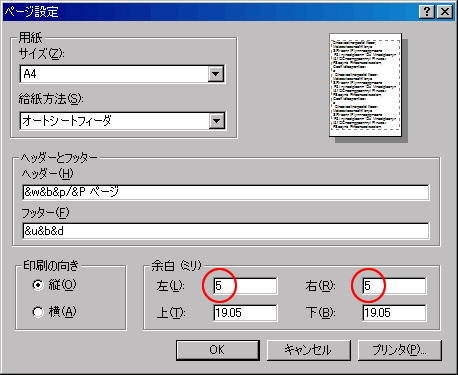
                      <td>（1） ブラウザのメニューバー「ファイル」→「<strong>ページ設定</strong>」をクリックしてください 。<br>
（2） <strong>余白（左：５）（右：５）</strong>以下に設定し、「OK」ボタンをクリックしてから印刷してください。</td>
                    </tr>
                    <tr>
                      <td><img src="../images/top_print_01.gif" width="458" height="375"></td>
                    </tr>
                  </table>
                  <br>
                  <br>
                  <img src="../images/home_13.gif" width="720" height="1"><br>
<br>
                  <table border="0" cellspacing="10" cellpadding="0">
                    <tr>
                      <td><b class="t16"><a name="02"></a>画像がプリントされない場合</b></td>
                    </tr>
                    <tr>
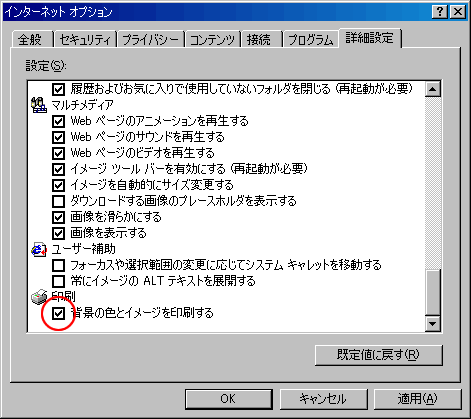
                      <td>（1） ブラウザのメニューバー「ツール」→「<strong>インターネットオプション</strong>」をクリックしてください。 <br>
（2） 「<strong>背景の色とイメージを印刷する</strong>」をチェック後、「適用」ボタンをクリックし、「OK」ボタンをクリックしてから印刷してください。</td>
                    </tr>
                    <tr>
                      <td><img src="../images/top_print_02.gif" width="471" height="419"></td>
                    </tr>
                  </table>
              </td>
          </tr>
        </table>
</div>
<!-- #EndEditable -->
        <table width="740" border="0" cellspacing="0" cellpadding="0" align="center" class="t12">
          <tr> 
            <td align="right" class="t10"><a href="#pagetop"><br>
              <br>
              Pagetop</a></td>
          </tr>
        </table>
        
      </td>
  </tr>
</table>
  <table width="740" border="0" cellspacing="0" cellpadding="0">
    <tr> 
      <td colspan="2"><img src="../images/spacer.gif" width="8" height="8"></td>
    </tr>
    <tr> 
      <td colspan="2" height="1"><img src="../images/home_12.gif" width="740" height="1"></td>
    </tr>
    <tr> 
      <td height="40"><img src="../images/spacer.gif" width="5" height="5"><img src="../images/cresc_copyright.gif" width="250" height="12" alt="Copyright(C) Crescendo Inc. All rights reserved."></td>
      <td align="right"><img src="../images/cresc_logo_02.gif" width="80" height="25"><img src="../images/spacer.gif" width="5" height="5"></td>
    </tr>
  </table>
</div>
</body>
<!-- #EndTemplate --></html>